
We already have a mobile money merchant number. Why integrate payments?
“Why can't we just put our mobile money merchant number on the website?”
Imagine you run a business in Uganda and want customers to pay for your services online. Some would use mobile money; others would prefer a debit or credit card. But now there is talk of extra setup, opening another account and supplying business documents again.
For mobile money, you already have something that works: a merchant number, the number customers enter to pay your business. Why should taking payments through your website involve more work?
That number can go on the website. The difference is what happens after someone pays. If a person checks the payment and provides the service, the number may be enough. If the website needs to handle those steps, it needs payment information too. That is payment integration: connecting payment information to the website so it can act on the result.
The learner has paid, but the course is still locked
Suppose the business sells access to an online course. A learner registers, pays using its merchant number and sends a message asking for access. The staff member who handles enrolments is away, so the learner waits.
When the staff member returns, they check the business's payment record, work out which learner and course the payment belongs to, and open access. They then add the payment and enrolment to the stored records used for reports.
The money arrived, but the course website did not know which purchase it belonged to. Displaying a merchant number gives the learner payment instructions. It does not tell the website that this learner has paid for this course.
Manual checks can work when learners know when to expect access. Here, though, the business wants learners to pay and begin without waiting for staff.
Connecting payment to course access
With payment integration, the website creates an order for the learner's chosen course. It includes an identifying number with the payment request, so the answer can be matched to the right order.
The website checks the payment service's answer: did the payment succeed, and was it for the expected order and amount? Once those checks pass, it opens the course and saves the payment and enrolment details. Staff can see who paid and received access without copying each purchase into another record.
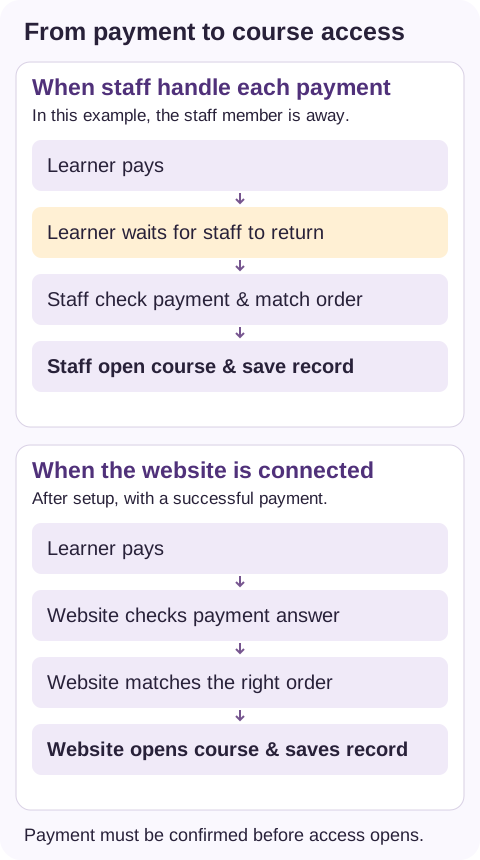
These steps must be set up and tested. Opening a payment account alone does not make the course website do them.
Does that mean using another payment company?
Connecting the website and choosing who handles payments are separate decisions.
Where the mobile money provider allows it, the website can connect directly to its service. The website uses an API for this connection — a way for two computer systems to send requests and replies. Here, the website asks whether the payment for an order succeeded, and the payment service sends back its status. This connection needs the provider's approval and setup; an existing merchant number does not automatically include it.
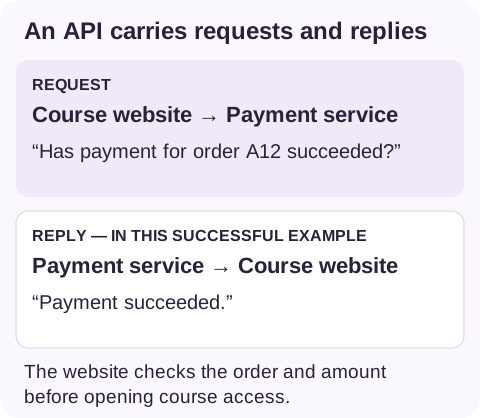
The course seller also wants card payments. A payment gateway is a service that connects the website to the payment methods it supports. A gateway company may offer mobile money and cards through one account. Available payment methods depend on the company and what it supports for that business in Uganda.
The learner might pay on a checkout page run by that company. But a payment page alone does not open the course. It can be used with staff checks or connected to the course website so that confirmed payments lead to access.
“We've already been checked. Why does another provider ask again?”
The business already supplied documents for its merchant account. Being asked again can feel like repeating work.
The new payment gateway company needs to carry out its own checks. It may ask who owns or runs the business, what it sells and where the collected money should be sent. Depending on the company and business type, this may mean identity documents, business registration papers, a description of the services and proof of the receiving account.
Checks by one provider do not automatically meet another's requirements. Merchant accounts also involve checks, and a direct connection to a mobile money provider can require further approval. The documents needed depend on the arrangement.
Is the extra work worthwhile?
For this course seller, the benefit is clear: learners can pay through supported methods and begin once payment is confirmed, even while staff are away.
That has to be weighed against setup, testing, fees and ongoing support. When and where the provider sends the collected money matters too.
There will still be cases needing help. While a payment is waiting for confirmation, the learner needs a clear update. If it fails, they need to know what to do next. Staff must be able to investigate when payment succeeds but course access does not open.
This is one use of custom software. An owner can describe what happens after customers pay without knowing how the connection should be built. Enquiries are welcome at [email protected].
A short checklist can help frame the conversation:
- What should happen after payment?
- How is it handled today?
- Where do customers wait or staff repeat work?
- Which payment methods are needed?
- Is the benefit worth the setup and ongoing costs?