
Selling on Facebook or TikTok: what happens after the customer says “I'll take it”?
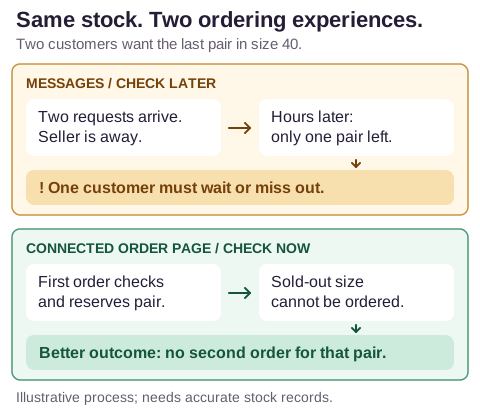
Imagine a shoe seller opening their messages after a busy morning away from Facebook and TikTok. Two customers have seen the pictures and each sent a request for the black shoes in size 40. Both think they have booked a pair.
The seller starts arranging deliveries, then discovers there is only one pair on the stock list. Another has been ordered from a supplier, but it has not arrived. Now one customer must wait while the seller checks the supplier, or hear that the shoes cannot be delivered as expected.
The problem began hours before the seller opened the messages. Customers were choosing from pictures that did not show what was still available. The answer came only when someone checked.
Automation means the system does agreed checks without waiting for the seller. Here, it could check stock as a customer orders, set the shoes aside for that order and stop offering the last pair to someone else.
What would the customer see instead?
Suppose the same seller directs customers from the pictures to an order page that uses the stock record. The remaining pair is in good condition and not already promised to someone.
In this example, the page checks the stock as it accepts the first order and makes a reservation. That means the pair is set aside for this customer and cannot be promised to someone else. Size 40 immediately disappears from the available choices or is marked sold out and cannot be ordered. Other sizes remain available. If no sizes remain, the product can be hidden from the list.
The next customer sees that size 40 is unavailable and can choose something else. In this example, the page stops a second order being accepted for the same pair.
Someone might already have the page open when the last pair is taken. The system needs to check again as it accepts their order, so two people cannot both claim that pair.
The Facebook pictures or TikTok videos need not disappear. They lead customers to the order page, where unavailable choices are disabled. A request sent separately in a message still needs a response; it has not reserved anything through that page.
The stock record has to tell the whole story
An inventory record keeps track of stock: what the seller has and what can be sold. For the shoe seller, it needs to show four different situations:
- On the shelf: shoes the seller has, with damaged pairs marked as unavailable.
- Reserved: shoes already promised to another order, even though they are still on the shelf.
- On order: the second pair expected from the supplier but not yet received.
- With the supplier: shoes the supplier says they can provide, which the seller has not yet ordered or received.
One pair on the shelf and one on order do not make two pairs ready to send. The page needs that distinction to give customers an honest answer.
Some sellers get shoes from a supplier only after a customer orders. Their page needs to explain the wait. A supplier's catalogue or old message does not prove the shoes are still available or when they will arrive. Until the supplier confirms, the request can remain marked “waiting for confirmation”.
The system could remind the seller when a supplier update is overdue. Someone still needs to obtain that update and record it. The software cannot know about a shortage the supplier has not reported.
From setting the pair aside to delivering it
For the first customer, the order record now holds the style, colour, size and quantity, their details, and the agreed payment and delivery arrangements. Keeping those details together means the seller does not have to copy them between several chats and sheets.
The reservation starts when the order is accepted, not when the shoes leave the shelf. The seller's rules determine how long that hold lasts. If the order is cancelled or the hold ends, the system can make the pair available again. When the seller marks it as sent, the record changes from “set aside” to “sent”. The same pair is not taken out of the available count twice.
The system can also be set up to send the customer an update once the order is marked sent. Delivery progress can be recorded in the same place. If the shoes come back, someone checks their condition before they go on sale again.
A better process without building everything from scratch
A shared stock sheet and regular message checks can help a seller organise a few requests. They still leave customers waiting while the seller is away. Missed messages and copying mistakes remain possible. That is the gap automation is meant to close.
An existing tool for orders and inventory may do the job. Connecting tools the seller already uses may also be enough. Custom software—software built for the particular job—may help where those options cannot handle the needed steps. Setup, staff learning to use it and ongoing support all matter to the choice.
The stock count still needs to be accurate, including shoes sold elsewhere. Software cannot create stock, guarantee delivery or make an unreliable supplier dependable. Its value here is that customers can see what they can order without waiting for the seller to come back online.
Contact Crownzcom to discuss setting up a process like this for you. The conversation can begin with what happens to an order today. Five useful questions are:
- Where is the complete order recorded?
- Who checks availability?
- When is stock set aside or made available again?
- How does the seller find out about supplier delays?
- Who updates the customer?