
Why build custom software when ready-made tools already exist?
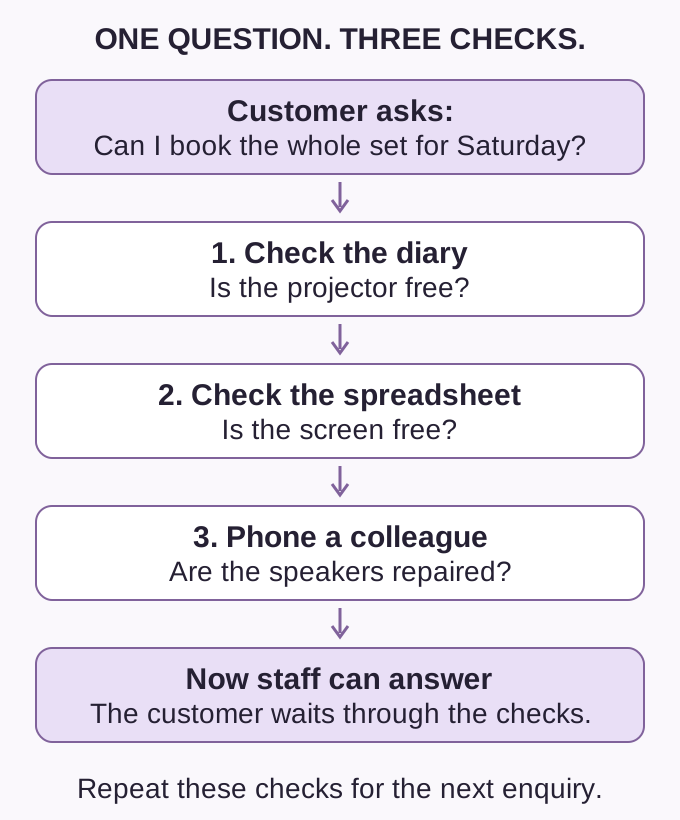
Imagine you hire out equipment. A customer asks: “Can I book a projector, screen and speakers for Saturday?”
You check the diary for the projector, open a spreadsheet for the screen, then phone a colleague to ask whether the speakers have been repaired. You cannot confirm the booking until you have all three answers. The customer waits.
You already have tools. The problem is that answering one ordinary question means searching in three places—and repeating that work for the next enquiry.
Would custom software help? If that term is new to you, it means software built for a particular need. It might help here, but an existing booking tool could already do the job.
What would make the work easier?
One shared record (perhaps a Google Sheet) of bookings and equipment condition might be enough. Staff could see which items were free and ready to hire, provided someone kept the record up to date.
But suppose customers also want to check availability and book in the evening, when nobody is answering calls. A shared record that only staff can see would not help those customers.
An existing hire tool might let a customer choose Saturday and reserve all three items together. It would need to keep damaged equipment out of the available choices and prevent the same item being promised to someone else. A demonstration using this booking would show whether the tool can handle it.
Custom work becomes worth considering if suitable existing tools still leave an important part of the job undone. The reason to build would be specific: customers could book a complete set without waiting for staff to piece together the answer.
That benefit has to be worth the cost of building and looking after the software.
A new product, a repeated task or a connection?
Custom software does not always mean a large new application. The amount of work depends on what is missing.
A service customers can use. Suppose the hire business wants to bring several suppliers together. A customer could request a projector from one, a screen from another and speakers from a third, all in one place.
That goes beyond keeping one company's booking diary. It could become a new online service. A small trial, with people handling the requests, could show whether customers want it and suppliers can keep their availability accurate. If existing tools cannot support the useful parts of the idea, a custom product may be worth exploring.
Automation: handling a repeated task. Automation means software carrying out an agreed task instead of a person repeating it each time. Imagine a manager copying approved staff hours into the same weekly report. Software could prepare that report for the manager to check.
The current tool may already offer that report. If it does not, a small addition might do the job. The useful change is simple: nobody has to type the same hours twice.
Integration: connecting existing tools. Integration lets separate software tools exchange information. Back at the hire business, staff copy each confirmed booking into an accounts tool to prepare the customer's bill. An integration could pass those details across without someone typing them again.
An existing integration might cover this. If not, a custom one could be considered, provided both tools allow the needed information to pass between them. Staff would still need a way to spot failed transfers and correct changed bookings.
Four choices, depending on the need
These choices can work together. A business could keep most of what it uses and add only the missing part.
| Choice | What it means | In the hire business |
|---|---|---|
| Keep | Use the current tools, with a clearer way of working. | Put bookings in one shared record and keep it updated. |
| Configure | Change an existing tool's settings to fit the job. | Set up available items and booking rules, if the tool supports them. |
| Connect | Let two tools pass information between them. | Send confirmed booking details to the accounts tool. |
| Build | Create software for a need the other choices cannot meet. | Make the missing part of the customer booking service. |
The comparison includes setup, any subscriptions, moving old records, staff training and future support. A small inconvenience does not always justify a new system. Repeated work or a service customers cannot currently use may give a stronger reason.
The work continues after launch
For the hire team, testing would mean trying real booking situations with the people who will use the system. What happens when someone cancels? Can two customers book the last projector? Can a customer see information that should be private?
The software also needs maintenance: fixing problems and keeping it working as other tools change. Someone must look after that work and help users. The agreement needs to say who owns the code—the instructions that make the software work—and who controls the accounts and business records. Another developer should be able to take over with the agreed access and information.
These responsibilities bring costs after the first version is finished. AI tools can help write software, but they do not decide whether the business needs it. People still need to check that it does the right job and keep it working.
Enough detail to start a conversation
A short note can help explain the need:
- Who will use it?
- What happens now?
- What is difficult or missing?
- What would a good result look like? For example, booking a complete set without waiting for a phone call.
- Which existing tools must it work with?
A reader does not need to work out the technical answer first. Those details can help establish whether the answer is a clearer process, an existing tool, a connection or a new build.
To discuss a need, explore Crownzcom's custom software service or contact [email protected].